


SnackShort
4.71.80K Reviews
App Specs
- Version
- 3.9.1
- Updated On
- License
- Free
- Downloads
- 1,000,000+
- Developer
- PopCulture Studio
- Categories
- Entertainment
- Platform
- Android, iOS
Screenshots
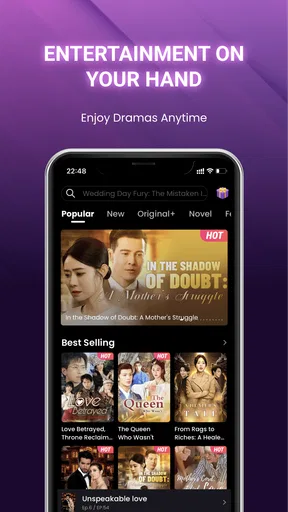
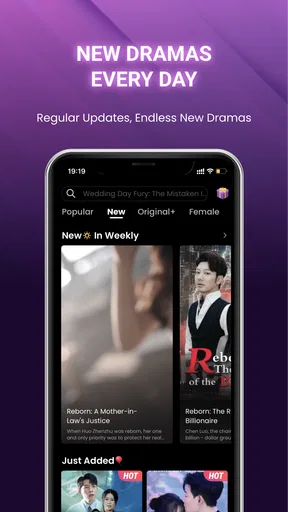
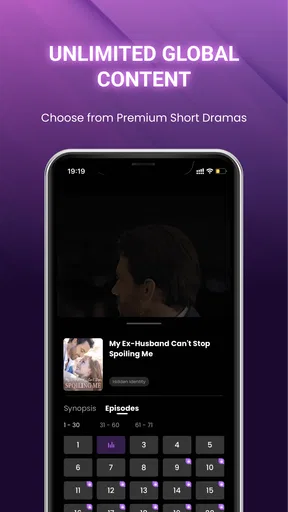
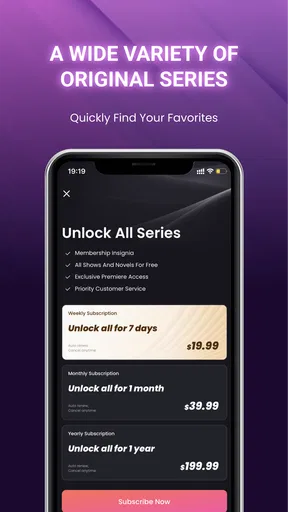
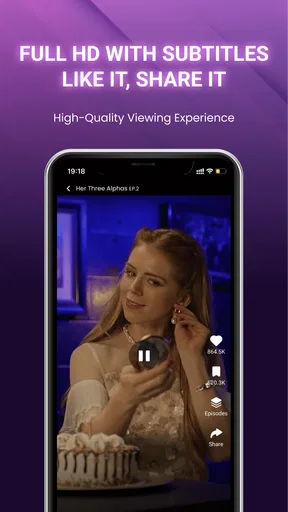
 Analysis by AppCompare
I’d be cautious about treating a shared phone as a shared entertainment account. SnackShort is built around mini drama series, so the experience is less like passing around a general video feed and more like taking turns with a story that can pull each viewer into the next episode. That distinction matters at home: a quick handoff can be convenient, but different tastes, viewing histories and spending expectations can make one person’s setup a poor fit for everyone else.
One device, several viewing habits
For a household, the simplest use is to treat the app as a source of short drama sessions during otherwise idle moments: one person watches while waiting for dinner, another takes a turn during a commute, and someone else may prefer not to use it at all. Since the episodes are designed to be consumed in short bursts, it can suit people who want a continuing story without setting aside a long block of time. I would still avoid assuming that everyone will enjoy the same series or that a shared viewing history will reflect each person’s interests.
A practical routine is to agree that the phone belongs to one viewer while a series is in progress, rather than letting several people tap through the app in quick succession. That keeps recommendations and progress from becoming a muddle, and it makes it easier to remember who was watching what. If the device is passed around, I’d pause before starting a new episode and check that the person using it is comfortable with the story and any on-screen material.
Keep account and spending expectations clear
Before anyone in the household uses an account, I’d decide who owns it and who is allowed to make purchases. SnackShort is free to install, but it includes in-app purchases, with items ranging from under a dollar to amounts that can reach $199.99. That wide range makes it sensible to review purchase settings on the device and explain that free access does not mean every possible option inside the app is free.
There is also a difference between sharing a device and sharing an account. A person using the same login may encounter the account holder’s viewing activity or make changes that affect their experience. I wouldn’t use one household account as though it were a separate profile for each person. If you need distinct histories, privacy boundaries or parental tools, check what your device and the app currently offer before relying on a shared setup; don’t assume those controls exist simply because the app is used by more than one person.
Where this format fits in an ordinary day
Imagine a short wait before an appointment. I might open a mini drama, watch a small portion, then stop when my name is called. Later, I can choose whether to continue, rather than having to remember a long film’s plot after a busy day. That stop-and-start rhythm is the strongest household use case I see: it can fit around errands and breaks, provided each viewer is happy with serialized storytelling and keeps an eye on how easily one more episode can turn into a longer session.
Compared with a broad short-video feed, a mini-drama app is a more focused choice. A general feed is better when you want unrelated clips, creator posts or a quick shuffle between subjects; SnackShort makes more sense when you want a story to follow in compact pieces. If your household mostly wants full-length films or television, a conventional streaming service is likely a better match. This is not a replacement for every kind of screen entertainment, and the format itself may feel repetitive to people who prefer complete stories in one sitting.
Worth Reading Before You Choose

EA SPORTS FC Mobile 26 Is a Bigger Football Game, but It Takes Time

Flipboard Shows What News Apps Must Do Beyond the Feed

Switching to Android Auto Means Rethinking Your Driving Routine

Google Calendar Makes a Crowded Week Easier to Manage

Ludo King Makes the Most of the Minutes Between Plans

Baby Panda World Brings Quick Play to Modern Phones, but Its Game Library Feels Busy
SnackShort is an entertainment app from PopCulture Studio. It is free to download, has a Teen content rating, and is currently at version 3.9.1, with Android 7.0 or later listed as the minimum requirement. Its average rating is 4.7 from around 58,000 ratings, and it has been installed over a million times. Those figures suggest a sizeable audience, but I’d treat them as context rather than a promise that every series will suit your household.
Discovering SnackShort
When I first fired up SnackShort, I was greeted with a super sleek and intuitive interface. It’s designed to get you hooked right from the start. You can instantly start exploring videos, with categories ranging from comedy to cooking tips, and everything in between. It feels like the developers really thought about how to make this app easy to use, even for someone who might not be particularly tech-savvy.
The beauty here is in its simplicity. You don’t have to sign up immediately; you can just start watching videos to get a feel of what the app offers. But trust me, you’ll want to create an account to unlock all the cool features. Once you do, you can follow creators, like and comment on videos, and even upload your own content.
Content Galore
Diving into the content, I was pleasantly surprised by the variety. The algorithm seems pretty sharp, because it quickly figured out my preferences and started showing me videos that matched my interests. The content is bite-sized, which is perfect for those quick breaks during the day. There’s a mix of user-generated content and more polished, professional videos, so you get a nice mix of everything.
One of my favorite things about the app is its discovery feature. You can easily explore trending topics or dive into niche categories. And if you’re a creator, this is a great platform to get your content in front of a wider audience. The app even has a section for challenges, which is a fun way to engage with other users and potentially go viral.
The Social Side of SnackShort
SnackShort isn’t just about watching videos; it’s a social platform too. You can follow your favorite creators and see what they’re up to. The app encourages interaction with features like comments, likes, and even duets, where you can create a video in response to someone else’s. It’s a brilliant way to build a community and connect with people who share your interests.
Plus, the app supports sharing content to other social media platforms. So, if you find a video you love, it’s easy to share it with friends outside of the app. This interconnectedness makes SnackShort a versatile tool for both entertainment and social interaction.
Monetization and Incentives
For those looking to make a little extra on the side, SnackShort offers monetization options for creators. You can earn through ad revenue or by participating in sponsored challenges. It’s not just about consuming content but also creating opportunities for creators to thrive. This is a digital playground where creativity is rewarded, which I think is a fantastic incentive for budding creators.
The app even hosts competitions and rewards for top content, which is a great way to keep users engaged and motivated. It’s a win-win situation: viewers get fresh content, and creators get recognized for their work.
Final Thoughts
In the crowded world of short video apps, SnackShort stands out by offering not just entertainment but also community and opportunity. Its easy-to-use interface, diverse content, and social features make it a must-have app for anyone who loves quick, engaging videos. Whether you’re a casual viewer or an aspiring creator, SnackShort provides a platform that’s both fun and rewarding.
If you haven’t tried it yet, give SnackShort a shot. You might find yourself pleasantly surprised by the depth and breadth of content available. Who knows? You might even become the next viral sensation!
A household decision, not an automatic fit
The main question I’d ask before installing it on a shared device is whether everyone is comfortable with the same style of entertainment. SnackShort is most appealing to viewers who like dramatic arcs delivered in small installments and enjoy returning to a story over several sessions. It is less suitable for someone looking for background music, practical how-to clips, or a random mix of unrelated videos. If that describes your household, a broader video platform or a standard streaming app may be a more useful first choice.
For parents, the Teen rating is a useful starting point, not a substitute for checking what a particular series contains. I’d preview a title before handing the device to a younger viewer and keep the phone’s ordinary purchase protections in mind. The rating gives a general age context; it doesn’t tell you whether a specific plot, tone or scene will be comfortable for your family. That small check is more reliable than assuming every mini drama has the same audience.
Make short sessions easier to manage
One trade-off with serialized viewing is that a convenient stopping point may not arrive exactly when you need it. I find it helpful to open the app only when I have enough time for a small break, rather than tapping into a series during a moment when I must leave immediately. In a household, agreeing on a natural stopping point before handing over the device can prevent arguments about who interrupted whose episode.
Another useful habit is to treat recommendations as a changing front page, not a carefully organized library. If several people use the same account, their viewing choices may influence what appears next, so one person’s quick experiment can make the next visit feel less personal. Keeping use to one primary viewer, or at least coordinating who is watching, is a straightforward way to reduce that friction without expecting the app to separate household members for you.
Who I’d recommend it to
I’d recommend trying SnackShort if you enjoy dramatic stories but rarely have time for a full-length episode, or if you want something more plot-driven than a stream of disconnected clips. It can also be a reasonable shared-device option when adults take turns knowingly, purchases are managed by the account owner, and viewers are comfortable with the Teen age context. The appeal is the compact, continuing format—not a promise that every person in the home will like every title.
I’d skip it, or choose another service, if you need robust household separation, want an ad-free long-form viewing setup, or expect the app to function as a general-purpose video library. It is also not the best pick for children who need an adult to screen every title but cannot be supervised while using the device. In those cases, a service with the specific profiles or parental tools your household requires is the safer, clearer match.
What to check before settling in
If you’re wondering whether you must create an account just to get a sense of the app, the original experience described here allows browsing before signing up. I’d use that opportunity to see whether the drama format and available material appeal to you before committing to an account. If you later decide to register, first consider whether the account will be personal or shared; that choice affects how comfortably the app fits into a family routine.
If your concern is cost, the download is free, but in-app purchases are available. I’d make the purchase boundary clear before letting another person use the device, especially if the device stores a payment method. If your concern is age suitability, the Teen rating is the sensible first filter, followed by a quick review of the individual story. These are separate questions: a free download does not settle purchase access, and an age label does not replace a parent’s own judgment.
My household verdict
For solo viewing or a carefully coordinated shared phone, SnackShort can fill small gaps in the day with episodic entertainment that does not demand a long uninterrupted session. Its strongest fit is a viewer who likes serialized mini dramas and can manage the temptation to keep watching. Its weakest fit is a household expecting separate tastes, clear account boundaries or child-focused controls to happen automatically.
I’d try it with one person’s viewing habits first, then decide whether sharing makes sense after seeing how the app suits your routine. Keep account ownership and purchase expectations explicit, check titles with younger viewers in mind, and choose a different service if your priority is long-form programs or household profiles. With those expectations, it can be an enjoyable option for compact story breaks; without them, the same convenience can become a source of confusion.
Pros
- User-friendly interface for easy navigation.
- Wide variety of short video content.
- Quick video loading with minimal buffering.
- Engaging community with active user interaction.
- Regular updates with new features and improvements.
Cons
- Limited video editing tools available.
- Some ads can be intrusive.
- Occasional bugs causing app crashes.
- Content discovery can be hit or miss.
- Requires constant internet connection.
FAQs for SnackShort
What is SnackShort and how does it work?
SnackShort is a social media app designed for creating and sharing short video content. Users can record, edit, and upload videos of up to 60 seconds. The app provides various editing tools, filters, and music options to enhance creativity. Users can engage with content by liking, commenting, and sharing videos within the community.
Is SnackShort free to use, or are there in-app purchases?
SnackShort is free to download and use, but it offers in-app purchases for additional features. Users can buy coins to access premium filters, effects, and music tracks. While basic functionality is available for free, these purchases can enhance the user experience for those looking to expand their creative toolkit.
What are the privacy settings available on SnackShort?
SnackShort offers various privacy settings to ensure user safety. You can set your account to private, allowing only approved followers to view your content. There are also options to block or report users, and control who can comment on or share your videos. Always review and adjust your privacy settings to suit your needs.
How does SnackShort handle content moderation?
SnackShort employs a combination of automated systems and human moderators to review content. The app has community guidelines that prohibit hate speech, explicit content, and harassment. Users can report inappropriate content, which is then reviewed by the moderation team to ensure a safe environment for all users.
Can I use SnackShort on both Android and iOS devices?
Yes, SnackShort is available for download on both Android and iOS platforms. The app is compatible with most modern smartphones and tablets. Ensure your device meets the minimum operating system requirements for optimal performance and access to all features. Updates are regularly released to improve compatibility and functionality.


